ANDONT
SKU:B0D3WPX5N7
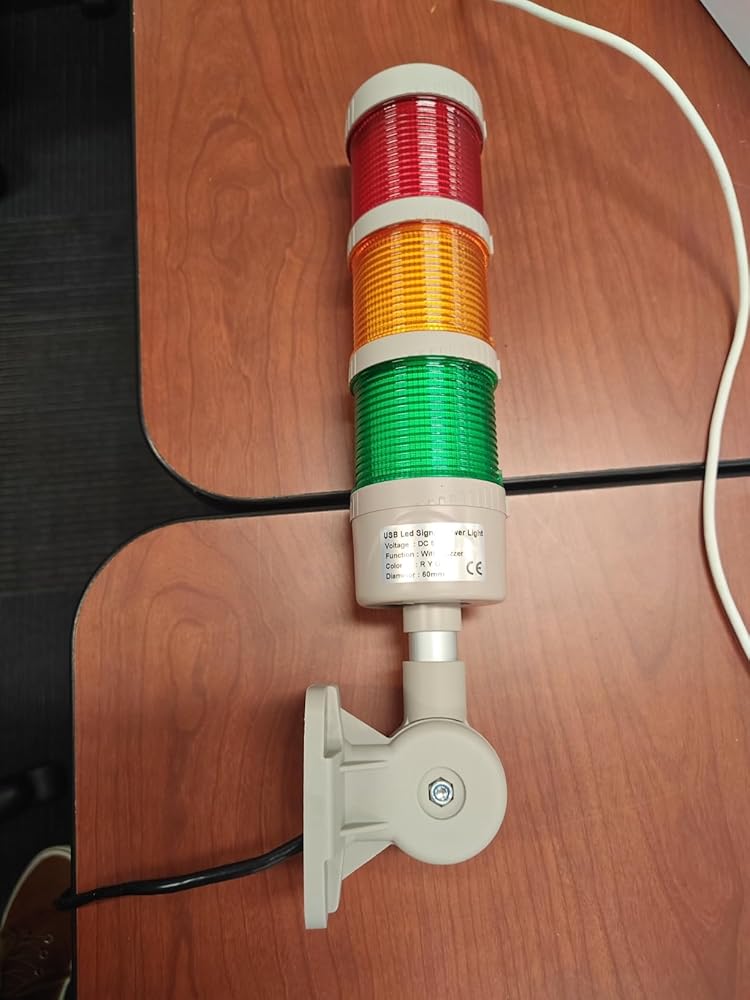
ANDONT USB 3-Stack LED Andon Tower Signal Light with Buzzer for Workstations, Industrial, 5VDC, Plug-and-Play(3 Stack)
Couldn't load pickup availability
- Industrial-Grade Reliability Constructed with premium industrial materials and precision manufacturing, ensuring long-term stable and reliable operation. Perfect for workstations, factories, laboratories, and warehouses to enhance production visibility and safety management.
- USB-Powered for Easy Deployment Standard USB (5VDC) power interface eliminates complex wiring. Can be directly connected to industrial equipment, computers, or standard USB power sources for fast plug-and-play installation, simplifying production line setup.
- Multi-Layer Visual and Audible Signals 3-stack LED lights (Red/Yellow/Green) clearly display operational statuses, complemented by a built-in buzzer producing up to 85 dB. Easily noticed in bright factory environments, improving workflow efficiency and alert response.
- High-Brightness and Energy Efficient Equipped with high-brightness LED chips with a wide viewing angle. Low heat generation, long lifespan, and energy-efficient design reduce maintenance and operational costs while ensuring reliable performance.
- Compact and Flexible Installation USB interface and compact design allow simple mounting on workstations, machinery, or other equipment without tools. Plug-and-play setup enables quick relocation and adaptability across different production environments.
-
Product description

ANDONT Stack LED Andon Tower Lights,Industrial Warning Lights
Operation steps:
1. Plug the light into the USB port.
2. View My Computer-right-click Management, System Tools-Device Manager, double-click the port (COM and LPT), and view the COM serial port number.
3. Open the USB three-color light debugging driver-commassistant.exe (you can also use other serial port debugging tools)
4. Select the COM serial port (whatever COM number you checked in the first step, select it here), serial port baud rate:
9600, 8 data bits, 1 stop bit, no parity bit. Check the hexadecimal system, send the corresponding code on the left to the blank area (note that there are spaces in the middle of each group of hexadecimal systems), click Send, and you can control the color and buzzer. (In practical applications, customers can make their own serial port tool and automatically send codes to control the desired effect)
5. After the test is OK, close the software and unplug the USB.
(Note: The status of each color can be controlled individually. After sending the control, you need to send the light-off signal again, and the corresponding color will turn off the light. The flashing frequency of all colors and buzzers is once per second.)

Introduction:
1. Exquisite structure, simple and beautiful, high cost performance;
2. the overall heat dissipation is good, to ensure product life;
3. can adjust the volume, function;
4. multiple colors can be freely combined.
A0 01 01 A2 Red light on
A0 01 01 B3 Red light flashing
A0 01 00 A1 Red light off
A0 03 01 A4 Yellow light on
A0 03 01 B5 Yellow light flashing
A0 03 00 A3 Yellow light off
A0 02 01 A3 Green light on
A0 02 01 B4 Green light flashing
A0 02 00 A2 Green light off
A0 05 01 A6 Blue light on
A0 05 01 B7 Blue light flashing
A0 05 00 A5 Blue light off
A0 06 01 A7 White light on
A0 06 01 B8 White light flashing
A0 06 00 A6 White light off
A0 04 01 A5 Buzzer on (loud)
A0 04 01 B6 Buzzer on (intermittent, loud)
A0 04 01 C7 Buzzer on (quiet)
A0 04 01 D8 Buzzer on (intermittent, quiet)
A0 04 00 A4 Buzzer off

USB-Powered Industrial Warning Lights
WARNING: PLEASE CONFIRM INPUT VOLTAGE BEFORE WIRING, AND ENSURE THE POWER IS DISCONNECTED
Enhance your automated assembly line with our innovative industrial warning lights. These USB-powered devices offer a practical solution for visual alerts in various industrial settings. Designed for efficiency and reliability, our warning lights are easy to install and operate, drawing power directly from a USB source. Ideal for use in automation equipment, security systems, and manufacturing environments.
Parameter:
Input voltage DC 5V Housing color Gray Working Temperature -20~45℃ IP rating IP40 Buzzer volume Max90dB Input wire length 0.75 meter Material PC lens, ABS body and AL pole Lifetime 50,000 hours Light Source SMD 2835 Certification CE Lens Color RYG
ANDONT USB 2-Stack LED Andon Tower Signal Light with Buzzer for Workstations
ANDONT USB 4-Stack LED Andon Tower Signal Light with Buzzer for Workstations
ANDONT USB 5-Stack LED Andon Tower Signal Light with Buzzer for Workstations
ANDONT 2 Stack Super Bright LED Andon Tower Lights with Buzzer, Red/Green, Of...
ANDONT 3 Stack Super Bright LED Andon Tower Lights with Buzzer, Red/Yellow/Gr...
ANDONT 4-Stack LED Andon Tower Signal Light with Buzzer, Red/Yellow/Green/Blu...Customer Reviews 4.0 out of 5 stars 164.0 out of 5 stars 164.0 out of 5 stars 164.2 out of 5 stars 264.8 out of 5 stars 224.4 out of 5 stars 19Price $79.99 $119.99 $149.00 $127.20 $170.56 $199.20 Number of Lights 2 4 5 2 3 4 Continuous/Flashing Continuous Continuous Continuous Flashing Flashing Flashing Colour Red,Green Red,Yellow,Green/Blue Red,Yellow,Green/Blue/White Red,Green Red,Yellow,Green Red,Yellow,Green Buzzer ✓ ✓ ✓ ✓ ✓ ✓ -
Share
Collections
-
ANDONT 2-Stack Andon Tower Light
2-Stack LED Andon Tower Signal Light, Red/Green, On/Off, ABB Selector Switch, Mean...
-
ANDONT 3-Stack Andon Tower Light
3-Stack LED Andon Tower Signal Light, Red/Yellow/Green, ABB Selector Switch, Mean Well...
-
ANDONT 4-Stack Andon Tower Light
4-Stack LED Andon Tower Signal Light, Red/Yellow/Green/Blue, ABB Selector Switch, Mean Well...
-
ANDONT USB Stack Andon Tower Light
ANDONT USB Stack LED Andon Tower Signal Light with Buzzer for Workstations,...
This USB Stack LED Andont Tower Lights with Buzzer, Industrial Warning Lights, Column Tower Lights(NOT 24VDC, 3 Layer, with Buzzer)This unit requires some kind of PC/tablet connected via USB to operate.It is USB powered AND it REQUIRES the use of a "serial port debugging tool" to control it by sending hexadecimal code series to the com port the USB cord of this unit is hooked up to. All done through a clunky "serial port debugging tool". The mfg directs you to "Open the USB three-color light debugging driver-commassistant.exe " so I looked it up before I d/l or install and could NOT FIND it. What I did find was a bunch of warnings regarding virus and malware abuse of similar system comm tools by them dastardly hackers. So, gave up on that and am currently trying to hardwire / bypass the circuit board and control directly from relays. The printed PCB board internals say USB on them, so I am certain I will need relays to hardwire / operate from a standard 24V control structure.Gave 4 stars just bc it is a well made unit with integral mounting bracket. Now if I can only McGyver it without using hexadecimal codes from an open com port.NOTE: edited og review as supplier had listed as a 24V device. They have edited the listing, and I would give 5 stars for fit and finish, but the clunky, nay, kludgy USB "serial port debugging" control architecture keeps it at 4 stars.*** NOTE TO ANDONT *** ditch the USB control, make it 24V, wire a single supply wire to the + side of each stage (including buzzer), return on a single common, let the light operate by a plc or hand switch or whatever control a relay OUTSIDE and independent of your unit. You will sell a ton of these "basic" units to not only hobbyists, but also in the industrial / commercial market.Also, I bet you could do this basic package at a lower cost.Let me know if you build this basic unit?
The media could not be loaded.
I constantly work in linux based environments and was looking for an alternative lightpost to the network ones I've worked on in the past. It's true, that if you are working in windows, you will need a serial debugger to send the commands outside of scripting, but for me, linux is made for this stuff.I just watched what device this associated to on connection, for the port I chose to plug it into, I know it will assign ttyUSB0. Then I just made sure the tty speed was set to 9600 baud with stty, and then I could control this guy with simple echo commands...Example:echo -en '\xA0\x01\x01\xA2' > /dev/ttyUSB0(Will turn on the red light)An easier way to do this was create a bunch of files and just cat them out to the device to use in my environment. So I would create a file called red.on using an echo command...echo -en '\xA0\x01\x01\xA2' > red.onAnd then i can always call this file to turn the red light on...cat red.on > /dev/ttyUSB0In any case, i know this isn't the setting for this kind of stuff, but I just wanted to put some snippets in case it helps anyone else get up and running right away.I will say, at first I had weird issues. Some commands would go through and some won't. Strangely, as soon as I did a hexdump of the device it started behaving. Doesn't seem related, but I can't remember if I did anything else. Awesome device though.
First, there's the almost total lack of documentation. As others have pointed out, the only documentation you get is what's here on the product page.If you send commands too quickly, it responds to them inconsistently. Maybe there's a way to send commands in batches so that it will respond to all of them, but, well, there's no documentation, so I can't imagine how I could find out. Ultimately what this means is that there is no consistent way to turn the green lamp off and the red lamp on at the same time. I have found that if you wait about half a second between commands, it works fine, but that's ... ugly. It seems like it's related to reading the commands back from the device; when I can't read the commands back, it won't accept a new command.Since it's not really possible to be certain that it's working correctly, it's hard to give it a high rating. It also has an annoyingly short USB cable. It's only about 30 inches long. It would have made more sense for there to be a jack and I could use whatever length cable I wanted to. I suppose you can get an extension cable, but it's annoying to have to have specialty cables.Also, another reviewer complained that the real brand name is "Andon", not "Andont". "Andon" is a manufacturing system that commonly uses this kind of stack light; it's not a brand at all, much less this manufacturer's brand.
I have to start by saying that I love this little thing, but for reasons that won't translate to a very wide audience. It's a piece of plastic with a USB cable without any manual controller. I personally don't agree with the description that it's "fashionable" - I won't be mounting this on the wall in a prominent place. If I ran a warehouse and wanted to guide forklift traffic, I could mount it near an intersection to guide traffic, but there's stll the little detail of making it work.Therein lies the core reason why I love it: with a Raspberry Pi, or some other system where you can control a USB port, it's programmatically possible to activate the lights. It takes a 5V connection, which is, conveniently, what a USB port provides for power. On my Debian system it mounts as /dev/ttyUSB0 and you can set the communiation channel with "stty -F /dev/ttyUSB0 9600 cs8 -cstopb -parenb".From there it's possible to send Hex codes from the command line like this: "echo -e '\xA0\x01\x00\xA1' >/dev/ttyUSB0" You can make a light be steady on, flash, or off, and you can do that with all three lights simultaneously. There's also a beep you can turn on and off. My personal project goal is to grab some data, like weather conditions and the short term forecast, and then translate that into a pattern that indicates current conditions and the short-term forecast.That's why I love it - it's a project toy. There are some oddities about it and it comes with no documentation. If you buy it, print out the product description so you have a copy of the Hex codes! There are a couple of sentences with it that are the key to making it work. It leverages a buffer and I haven't quite figured out the right path to turning things on and off reliably (there's a sequence I need to crack).The hardware itself is decent enough as in it doesn't feel cheap, but it's plastic so don't hang something important from it. Also, the plastic base doesn't have a molded channel for the USB cable. If I mount this to a wall , I'll need to carve out some of the plastic so the base doesn't bite into the cable (there's a place at the base they thinner so you can make a notch). I wish they'd done that and provided just a little better documentation on how to send it signals.
This is a review for the USB Stack LED Andon Tower Lights with Buzzer. While it is somewhat of a specialty product, it performs exactly as advertised! I started off by piping commands on a Linux host to the serial device, then the same on a Raspberry Pi. All lights lit properly in solid or flashing mode and the beeper/buzzer sounded as expected. The lights were incredibly crisp and visible from a distance even in a well lit room. All of the serial commands worked flawlessly once I hashed out the meaning of the wording for the beeping options.I plan to use the device to throw visual warnings from monitoring systems on a Raspberry Pi, and ended up writing a little Python script to store command files for each light mode/method, and send them via serial.