ANDONT
SKU:B0DLKKFCZB
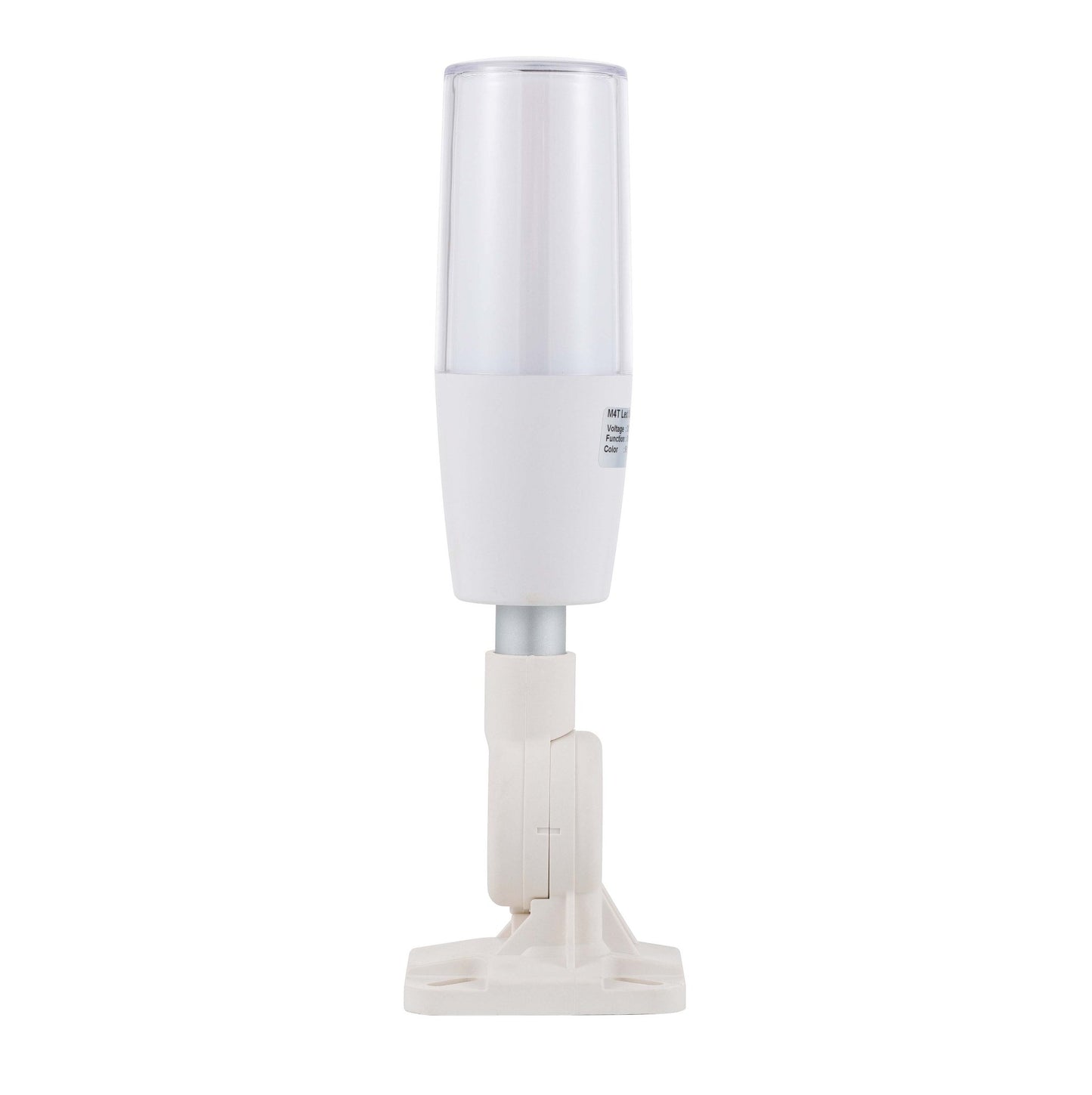
ANDONT 7-Color USB LED Tower Signal Light with Buzzer, 5V DC, ABS Body, PC Lens, Plug-and-Play
Couldn't load pickup availability
- Industrial-Grade Reliability Built with premium industrial materials and precision engineering, ensuring stable long-term operation in factories, workshops, laboratories, and warehouses.
- USB-Controlled & Programmable Operates via USB interface and programmable with included CH341 software. Easily reconfigure signal patterns to meet your workflow needs without extra hardware.
- Seven Vibrant Colors Preconfigured RGB LEDs produce up to 7 colors (Red, Green, Blue, Cyan, Yellow, Magenta, White) on a single layer, providing clear visual alerts for machine or process status.
- Audible Alerts with Buzzer Integrated buzzer delivers a loud, clear sound exceeding 85 dB, ensuring alerts are noticed in noisy industrial environments.
-
Flexible Installation Options Three types of bases available for easy mounting, adjustable pole length for different setups. Compact and plug-and-play design allows fast deployment.
Product description

ANDONT USB Stack Light Signal
Operation steps:
1. Plug the light into the USB port.
2. View My Computer-right-click Management, System Tools-Device Manager, double-click the port (COM and LPT), and view the COM serial port number.
3. Open the USB three-color light debugging driver-commassistant.exe (you can also use other serial port debugging tools)
4. Select the COM serial port (whatever COM number you checked in the first step, select it here), serial port baud rate:
9600, 8 data bits, 1 stop bit, no parity bit. Check the hexadecimal system, send the corresponding code on the left to the blank area (note that there are spaces in the middle of each group of hexadecimal systems), click Send, and you can control the color and buzzer. (In practical applications, customers can make their own serial port tool and automatically send codes to control the desired effect)
5. After the test is OK, close the software and unplug the USB.
(Note: The status of each color can be controlled individually. After sending the control, you need to send the light-off signal again, and the corresponding color will turn off the light. The flashing frequency of all colors and buzzers is once per second.)

Introduction:
1. Exquisite structure, simple and beautiful, high cost performance;
2. the overall heat dissipation is good, to ensure product life;
3. can adjust the volume, function;
4. multiple colors can be freely combined.
Application:
Automated assembly line, Automation equipment, Security equipment, LED
encapsulation equipment , Alarm system, SMT equipment, CNC machine tool,
Engraving machine, Lathe, Milling machine, Mining machine
Control instruction:
Use software to send instruction (9600 Baud, hexadecimal) to control lamp
Parameter:
Input voltage DC 5V Housing color Gray Working Temperature -20~45℃ IP rating IP53 Buzzer volume Max90dB Input wire length 0.75 meter Material PC lens, ABS body and AL pole Lifetime 50,000 hours Certification CE Installation Bracket
ANDONT 2-Stack LED Andon Tower Signal Light, Red/Green, On/Off, ABB Selector ...
ANDONT 3-Stack LED Andon Tower Signal Light, Red/Yellow/Green, On/Off, ABB Se...
ANDONT 4-Stack LED Andon Tower Signal Light, Red/Yellow/Green/Blue, On/Off, A...
ANDONT 2-Stack LED Andon Tower Signal Light with Buzzer, Red/Green, On/Off/Fl...
ANDONT 3-Stack LED Andon Tower Signal Light with Buzzer, Red/Yellow/Green, On...
ANDONT 4-Stack LED Andon Tower Signal Light with Buzzer, Red/Yellow/Green/Blu...Customer Reviews 3.4 out of 5 stars 244.8 out of 5 stars 384.6 out of 5 stars 174.2 out of 5 stars 264.8 out of 5 stars 224.4 out of 5 stars 19Price $149.00 $153.45 $175.66 $127.20 $170.56 $199.20 Number of Lights 2 3 4 2 3 4 Continuous/Flashing Continuous Continuous Continuous Flashing Flashing Flashing Colour Red,Green Red,Yellow,Green Red,Yellow,Green Red,Green Red,Yellow,Green Red,Yellow,Green Buzzer no data no data no data ✓ ✓ ✓
Share

Collections
-
ANDONT 2-Stack Andon Tower Light
2-Stack LED Andon Tower Signal Light, Red/Green, On/Off, ABB Selector Switch, Mean...
-
ANDONT 3-Stack Andon Tower Light
3-Stack LED Andon Tower Signal Light, Red/Yellow/Green, ABB Selector Switch, Mean Well...
-
ANDONT 4-Stack Andon Tower Light
4-Stack LED Andon Tower Signal Light, Red/Yellow/Green/Blue, ABB Selector Switch, Mean Well...
-
ANDONT USB Stack Andon Tower Light
ANDONT USB Stack LED Andon Tower Signal Light with Buzzer for Workstations,...
Nice quality, compact size, convenient lighting:This product is well made and feels durable and solidly constructed while handling. The light is relatively compact, making it easy to move around or store away when not in use, but the LED lighting gets bright enough where you can see it pretty well even from a distance. This product is very convenient since it can be operated via USB and doesn't rely on an outlet to power up. The device is also pretty simple to control and adjust the lighting, making it a good option for a number of different use cases.Overall, this is a good product and I would recommend.
The light works well. There is one issue with the instructions on the product page.Just know that the buzzer "off" is 0x01 and on is 0x02 - you'll be surprised if you send the command expecting it to be off with their instructions.I don't use their software, never trust stuff like that. I use Python and write small interfaces using their serial module.This popped-up on my windows PC as COM7 (yours may vary). A simple bit of code makes it work.Pretty bright and an annoying buzzer - exactly what the doctor ordered.And just for completeness, if you missed it in the product page, it's 9600 baud, 1 stop bit with no parity.
This is an interesting device, driven via Hex data via the USB port.I used the URT Assistant SW from the MS Store. You send a Hex string and it activates the light, color, buzzer and/or blink rate. You connect at 9600 baud, 8-bit, 1 stop bit and type in the hex string.Example: To light the fixture send: FF 02 01 02 AA - Which tells it to: Open comms, Light Green, no buzz, 0.85 second Flash rate, Close comms.It works as expected.Other reviews and the product description are very helpful to get this running. It WILL NOT work without something (software) to send the Hex data to the fixture. This would be great for use with an Arduino, Raspberry Pi or other micro controller.I'm going to setup a simple program on my PC to light the lamps for use for a raffle drawing - Let folks know when a drawing is coming, waiting for a prize claim and prize winner is about to expire.Brightness is OK. Not daylight sufficient, however.The Buzzer (beeper) is about 80-90dB, so not too loud.Teh mount is well made for mounting on a flat surface. No hardware included.The clear cover is removable with a twist, but is probably NOT water resistant. The base is removable by pulling the fixture off of the aluminum mounting shaft. Teh USB cable threads through this.The Buzzer sound is vented out of the bottom of the fixture.Teh USB cable is not very long - about 30".
#!/usr/bin/env python3"""M4T Signal Tower Light python apihttps://www.amazon.com/dp/B0DLKKFCZB"""from serial.tools import list_portsfrom serial import Serialimport argparseimport sysclass Modes(): _map = {} _current = None def __init__(self): self._current = self._map["off"] @classmethod def modes(cls): return list(cls._map.keys()) def set(self, x): if x not in self._map: raise RuntimeException(f"Value for {self.__name__} must be one of {cls._map.keys()}, got {x}") self._current = self._map[x] def get(self): return self._currentclass LightModes(Modes): _map = { "off": 0x01, "green": 0x02, "blue": 0x3, "red": 0x4, "cyan": 0x5, "yellow": 0x6, "magenta": 0x07, "white": 0x08, }class AlarmModes(Modes) : _map = { "off": 0x01, "on": 0x02, }class BlinkModes(Modes): _map = { "off": 0x01, "fast": 0x02, # 0.85s/time "normal": 0x03, # 1.7s/time "slow": 0x04, # 2.5s/time }class M4TTower(): _id = "1A86:7523" _baud_rate = 9600 _light = LightModes() _alarm = AlarmModes() _blink = BlinkModes() def _send(self): self._serial.write(bytes([0xFF, self._light.get(), self._alarm.get(), self._blink.get(), 0xAA])) def __init__(self): d = list(list_ports.grep(self._id)) assert len(d) == 1, f"Found more then one device with vendor:product {VID_PID}." self._serial = Serial(d[0].device, self._baud_rate, timeout=0) def set(self, light, alarm, blink): self._light.set(light) self._alarm.set(alarm) self._blink.set(blink) self._send()def main(): parser = argparse.ArgumentParser(description=__doc__) parser.add_argument("--light", "-l", default="off", choices=LightModes.modes(), help="The light state") parser.add_argument("--alarm", "-b", default="off", choices=AlarmModes.modes(), help="The alarm state") parser.add_argument("--blink", "-f", default="off", choices=BlinkModes.modes(), help="The blink state") args = parser.parse_args() tower = M4TTower() tower.set(args.light, args.alarm, args.blink)if __name__ == "__main__": sys.exit(main())
This industrial signal has seven colors to communicate. It integrates with existing systems withhout needing a PLC. It's a compact design so doesn't take up much room. It can be controlled by a PC with user-friendly software. It doesn't take technical expertise to set this up.